

Is Vance Video AI worth it?
Yes, for cleaning up footage you already own. No, if you need a tool that creates videos.
Choose Vance Video AI if you
- Have old or low-resolution clips to fix
- Want a browser tool with no GPU needed
- Want to preview before spending credits
- Have a Windows PC and a large library
Look elsewhere if you
- Want to generate videos from a prompt
- Need written commercial-use terms
- Expect a free plan beyond 10 credits
- Want one fixed price per finished video
Vance Video AI scores
Eight checks, each out of 5. We judge it as an enhancer and do not mark it down for features it never claims.
Vendor material and users call the cleanup sharp, but we found no independent footage tests.
Six enhancement tools and no generation. It covers one job and nothing else.
Denoise, HDR, colour and smoothing are separate tools, with no timeline or trimming.
Drop a clip, set options, preview the first seconds, then export. Nothing to install.
Neither the pricing page nor the Video Studio page states commercial use terms.
Web credits cost about 3 to 6 cents each, and the Windows lifetime plan is $129.90.
Credits are charged once per result and roll over, but some reviewers report refused refunds.
There is no free plan. New accounts get 10 trial credits, and previews cost very little.
Vance Video AI pricing in 2026
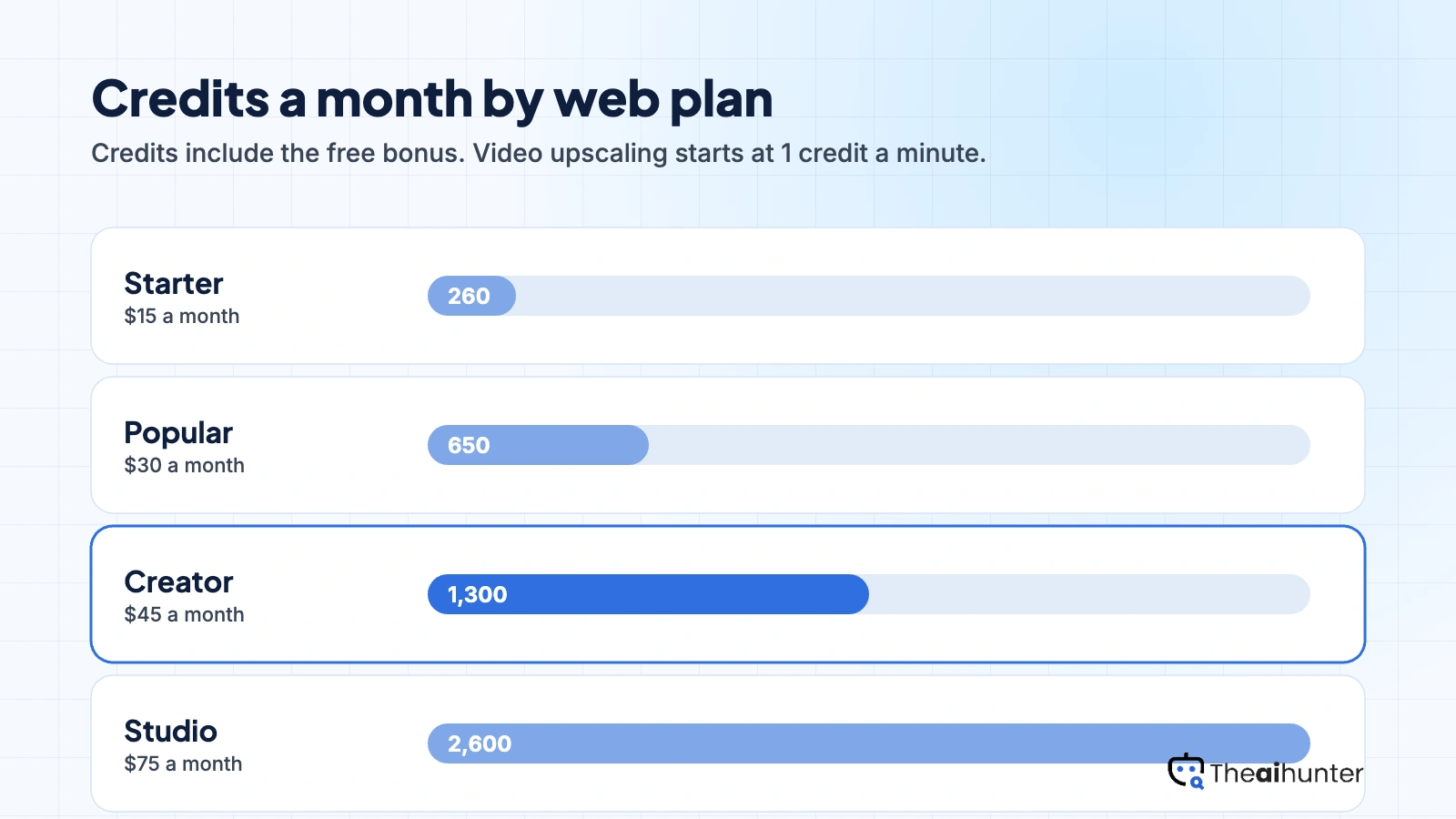
Vance Video AI bills in credits shared across its image and video tools. Video upscaling starts at one credit a minute and rises with scale and frame rate.
| Plan | Price a month | Credits | Video, roughly | What it adds |
|---|---|---|---|---|
| Starter | $15 | 260 | Up to 260 min | $0.058 a credit. Paid exports carry no watermark |
| PopularMost creators | $30 | 650 | Up to 650 min | $0.046 a credit. Priority support listed |
| Creator | $45 | 1,300 | Up to 1,300 min | $0.035 a credit |
| Studio | $75 | 2,600 | Up to 2,600 min | $0.029 a credit, the lowest rate |
USD prices from the VanceAI pricing page, checked November 18, 2026. Annual billing is listed at 12 times the monthly price, although the page advertises 25 percent off, so check the rate at checkout. Windows plans are separate.
What common jobs cost
Starter covers up to 260 minutes at the base rate, or fewer at 2x scale. That is plenty for a handful of clips a month.
Popular suits a creator cleaning several videos a week. Choosing 2x scale or 120 fps doubles the credit rate, so budget for it.
The Windows lifetime plan processes locally with no credit use and covers one PC. It beats a subscription for a single large library.
The pricing page gives only a from-one-credit-a-minute rate. Run a 3 second preview first, which costs roughly 0.1 to 0.3 credit.
Can you use Vance Video AI output commercially?
We could not confirm it. The pricing page and the Video Studio page do not address commercial use. The bigger question is usually rights to the source footage, which you need to clear yourself.
| What you want to do | Web plans | Windows desktop |
|---|---|---|
| Downloads without watermark | Paid plans | Paid plans |
| Free trial | 10 credits | 100 web credits |
| Commercial use | Not stated | Not stated |
| Where files are processed | Vance servers, deleted in 24 hours | On your own PC |
| Credits needed | From 1 a minute | None for local work |
| Priority support | Listed | Listed |
| Use on several machines | Any browser | One PC per licence |
Ask VanceAI support for written commercial terms before using enhanced footage in paid client work.
Vance Video AI features for creators
Six tools for improving footage, plus a Windows app and an API.
Video upscaler
Raise resolution and sharpness on soft clips, with a 2x scale option.
From 1 credit a minuteDenoise and sharpen
Clean grain and compression noise in one pass.
Priced by lengthSDR to HDR
Lift standard footage toward HDR brightness and colour.
Separate tool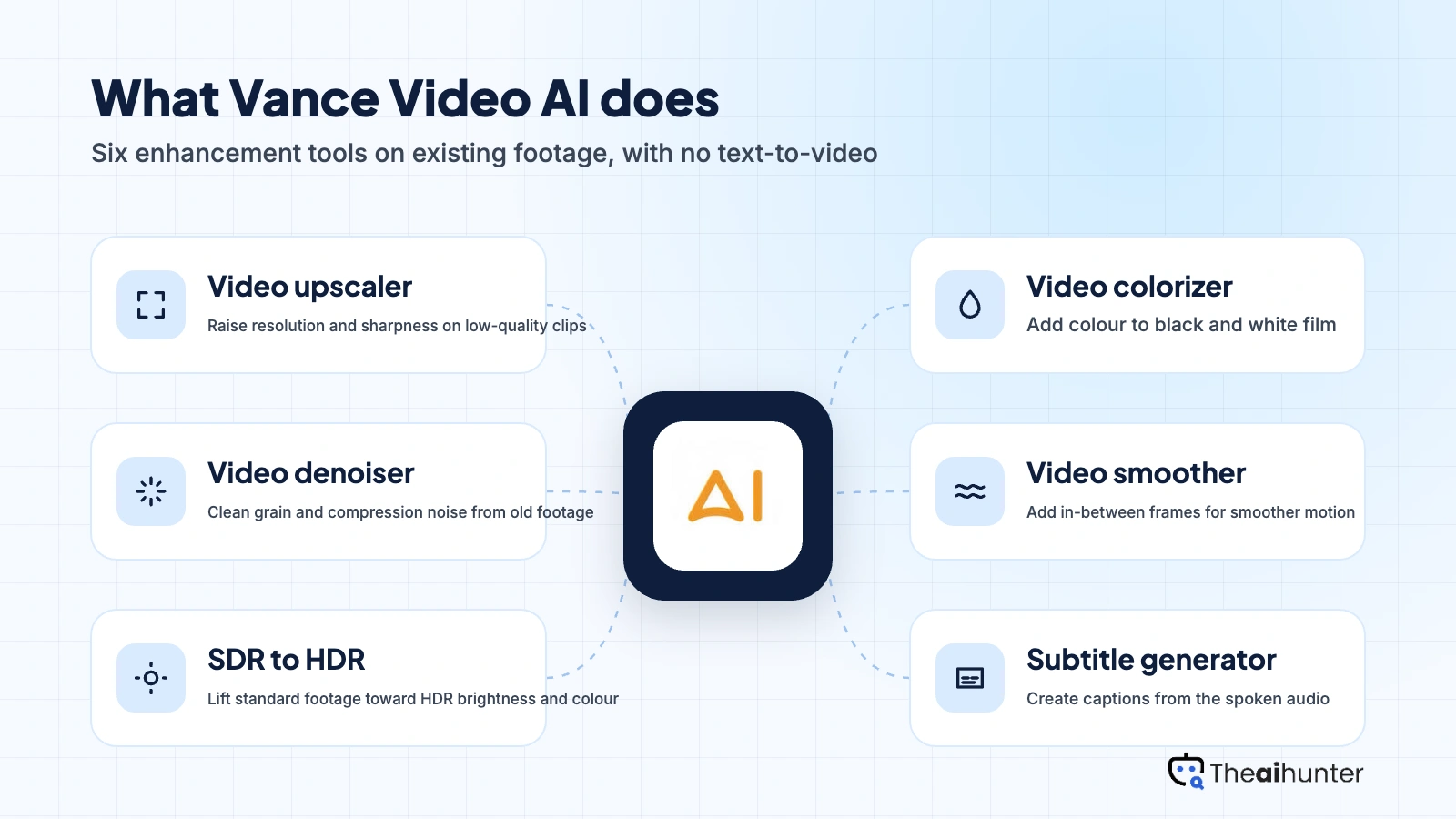
Video colorizer
Add colour to black and white footage.
Separate toolVideo smoother
Add in-between frames for smoother motion.
Separate toolWindows app and API
Process locally with no credits, or run video jobs through the API.
Paid plansPros and cons
Pros
- Browser-based, so the web version needs no GPU or install
- Credits are charged once per result, and re-downloading a file is free
- A short preview costs a fraction of a credit before you commit
- The Windows lifetime plan at $129.90 avoids credits entirely
Cons
- It improves footage you have and cannot create video from text
- Commercial use terms are not stated on the pricing page
- Credit cost depends on resolution, frame rate and scale, and only a starting rate is published
- Annual web prices equal 12 months of the monthly price, so the advertised discount is unclear
What users complain about
More than 1,300 Trustpilot reviews rate VanceAI around 4.4 of 5. The complaints we read mostly concern refunds and billing, often on its photo tools.
Refunds get refused
Trustpilot reviewers describe refund requests turned down under the refund policy, including after little or no use. The same billing terms apply to the video tools, so use the trial first.
Surprise annual charges
Several reviewers say they expected a short trial and were charged for a year. Check the billing period before you pay.
Credits lost on API shutdown
One long-time customer says an API shutdown with a month of notice left unused credits unrefunded. API credits are a separate balance from web credits.
Hard to predict video cost
Futurepedia flags that credit cost varies with duration, resolution, frame rate and settings. Run a preview before a long file.
Vance Video AI alternatives
If you also need to cut, caption or brand a video, an editor fits better. For heavy enhancement on a strong PC, Topaz Labs is the usual comparison.


Vance Video AI FAQ
Is Vance Video AI free?
There is no free plan. New accounts get 10 trial credits, and a short preview of the first seconds costs a fraction of a credit. Anything beyond that needs a paid web plan from $15 a month or a Windows licence.
Can Vance Video AI generate videos from text?
No. It improves footage you upload and has no text-to-video mode. For that you need a generator, such as VideoGen or Vadoo AI.
How much does it cost to upscale a video?
Upscaling starts at one credit a minute at 1080p, 24 fps and 1x scale. Choosing 2x scale or 120 fps doubles the rate, and longer files cost more. On Starter a credit works out to about 5.8 cents.
Is the Windows desktop app worth it?
For a large library it can be. The Windows plans cost $39.90 a month, $99.90 a year or $129.90 once, process locally without credits and cover one PC. Web credits suit a few clips better.
Can I use enhanced footage commercially?
We could not confirm it. The pricing and Video Studio pages do not address commercial use, so ask VanceAI support for written terms before client work.
How we review AI video tools
Every video tool on Theaihunter goes through the same four steps and gets the same eight scores, so any two video tool scores on this site can be compared directly.
Read the vendor’s own pages
Plans, credit and minute limits, and license terms come from the product’s site first. We note the date we checked each one.
Test what we can reach
We sign up and check what the free plan and settings allow. When a login or paid credits are needed to go further, the review says what we did not test. Samples go on the page only when the license permits it.
Cross-check what users report
Independent reviews and user complaints from the last six months show what the sales page leaves out. Numbers copied across lookalike sites count once.
Score, date and update
Eight areas get a score from 1 to 5. When pricing or plans change, we recheck the review and log the change in its history.
How the score works
Each area is scored from 1 to 5. The overall score is their average, rounded to one decimal.
It is the same number on the review, the category page and anywhere else the tool appears.
- No review, no score. Tools we have not reviewed in full are never ranked.
- A strong output cannot hide unclear licensing, because each area is scored on its own.
Some links earn us a commission. A score or verdict is never changed because of one.
Prices, credits and limits are checked against the vendor’s pages and dated. When sources disagree, the review says so.
If we used a feature, we say so. If a detail comes from user reports, the review labels it as reported.
Ready to try Vance Video AI?
Ten free trial credits.
