
Trevor Logo
Editor's Rating:
Trevor AI is best for smart time-blocking, turning to-do lists into structured schedules, and helping users manage tasks efficiently without feeling overwhelmed.
Pricing Model: Freemium
Starting Price: $6
Trevor Review

What is Trevor?

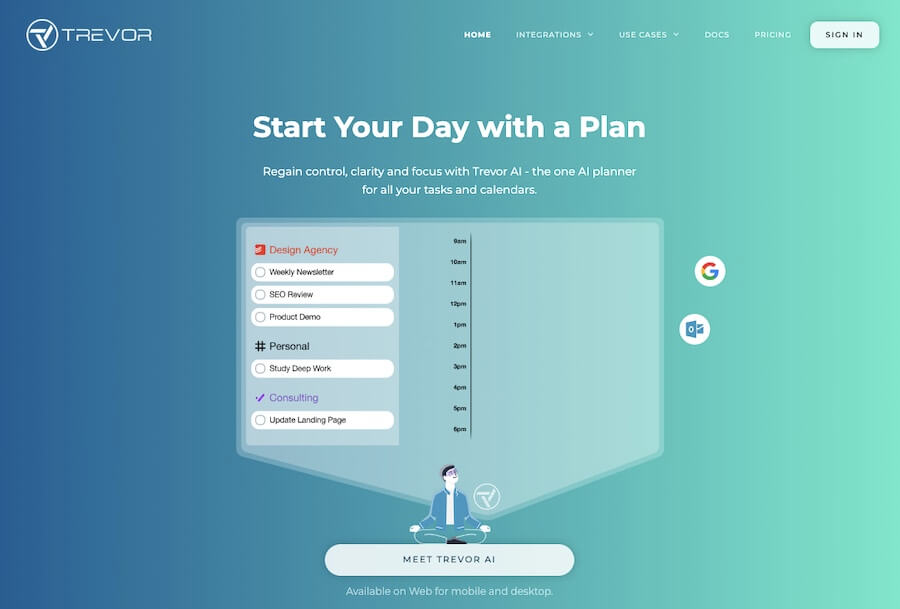
Managing your time can feel overwhelming, but Trevor AI makes it effortless. It’s a smart daily planner that turns your to-do list into a structured schedule, helping you stay productive without feeling rushed.

Instead of just listing tasks, Trevor helps you plan when to do them by intelligently time-blocking your day. It integrates with your calendar, ensuring you never miss an important task or overbook yourself.

What makes Trevor AI stand out is its simple yet powerful approach to scheduling. You don’t just check off tasks, you assign them time slots, making sure everything fits into your day realistically.

The AI adapts in real time, adjusting your plan if priorities shift or unexpected tasks come up. Need to move something around? Just drag and drop, and Trevor smoothly reschedules everything to keep your day balanced.

For professionals, students, and anyone juggling multiple responsibilities, Trevor AI keeps things structured. It syncs with Google Calendar, so all your tasks and meetings are in one place.

If you have a long list of things to do, it helps you break them into manageable slots instead of feeling buried under an endless workload. It also prioritizes tasks based on deadlines, ensuring nothing gets pushed aside.

Instead of feeling scattered or constantly guessing what to work on next, you wake up with a clear plan. Trevor AI helps you take control of your time without the stress of micromanaging every minute.

Whether you’re tackling a big project, organizing your workday, or just trying to be more efficient, Trevor makes sure your schedule actually works for you.


Show More

Trevor Review 2026: Top Features, Pricing, Pros & Cons

Trevor: Editor's Rating

Here's a detailed breakdown of Trevor rating based on different parameters.
Ease of Use
4.4/5
Very clean interface; task-to-calendar flow is effortless
Features & Functionality
3.9/5
Strong for task scheduling; lighter in advanced automation
Output Quality
4.0/5
Daily plans feel realistic and well-structured
Performance & Speed
4.2/5
Smooth experience; syncing with calendars is quick
Customization / Controls
3.7/5
Basic rules available; deeper customization limited
Reliability
4.1/5
Stable app; occasional sync quirks reported by users
Integrations / Export Options
3.8/5
Works well with Google Calendar; integrations beyond that are minimal
Pricing & Value
4.0/5
Good value for individuals; generous features for the price
Support & Resources
3.8/5
Helpful guides; small team means slower response at times
Privacy & Data Safety
4.0/5
Standard app-level protections; simple and transparent policies
Overall rating
4.0/5
Excellent lightweight scheduler; limited but dependable

Trevor Top Features

Smart Time-Blocking
Trevor AI automatically schedules your tasks into time slots, helping you manage your day efficiently.
Task-to-Calendar Integration
It syncs with Google Calendar, allowing you to turn to-do lists into scheduled events without switching apps.
Real-Time Task Rescheduling
If priorities shift, Trevor adjusts your schedule instantly, ensuring you stay on track.
Drag-and-Drop Planning
Easily move tasks around your calendar by dragging and dropping, making rescheduling effortless.
Task Prioritization
Organizes tasks based on deadlines and urgency, so nothing important gets forgotten.
Focus Mode for Deep Work
Blocks distractions by setting dedicated time for important tasks.
Automatic Time Estimates
Helps you allocate the right amount of time for each task, improving efficiency.
Daily and Weekly Planning
Gives a clear overview of your upcoming schedule so you can plan ahead.
Cross-Device Access
Works on desktop and mobile, keeping your schedule updated wherever you go.
Minimalist and User-Friendly Design
A clean and intuitive interface makes planning your day simple and stress-free.

Trevor Pros & Cons 2026

Pros
Automatically converts tasks into a structured schedule.
Smart time-blocking for better productivity.
Integrates seamlessly with Google Calendar.
Allows easy drag-and-drop task rescheduling.
Adapts to changing priorities in real time.
Helps prevent task overload by balancing workload.
Cons
Limited free version with advanced features behind a paywall.
Only integrates with Google Calendar, no Outlook support.
AI scheduling may not always match personal preferences.
Requires manual task input for full functionality.

Trevor Pricing 2026

Plan your day with Trevor AI - the daily planning assistant to schedule your tasks in your calendar. Check out their plans
Pro
$6/month, paid monthly

Please note that pricing information may not be up to date. For the most accurate and current pricing details, please refer to the official website.

Trevor Use Cases

Structuring Your Workday

Trevor helps you break down tasks into time slots, ensuring a balanced and productive day.

Managing Deadlines Efficiently

Schedules tasks based on priority, making sure urgent deadlines are always met.

Avoiding Task Overload

Prevents overbooking by spacing out tasks realistically throughout your day.

Adapting to Changing Plans

Reschedules tasks in real-time if something urgent comes up.

Boosting Focus and Productivity

Blocks time for deep work so you can concentrate on important tasks without interruptions.

Planning Projects Step by Step

Allows you to schedule long-term projects into manageable daily or weekly tasks.

Trevor Questions & Answers

Trevor AI is a time-blocking assistant that schedules tasks into your calendar, helping you manage your day efficiently and stay productive.
Trevor AI offers a free version with basic features, while premium plans provide advanced scheduling and customization options.
Yes, Trevor AI syncs seamlessly with Google Calendar, allowing users to schedule tasks directly into their existing calendar.
Yes, Trevor AI adjusts your schedule in real-time if priorities change, ensuring your day stays organized.
Yes, Trevor AI is accessible on both desktop and mobile devices, allowing users to manage their schedules on the go.

Trevor User Reviews 2026

Overall Trevor Rating
0.0 out of 5 stars (based on 0 reviews)
Rating Distribution
Excellent0%
Very good0%
Average0%
Poor0%
Terrible0%
Share Your Experience

Trevor: Recent Reviews

There are no reviews yet. Be the first one to write one.

Submit Your Review For Trevor

Pricing:
Categories:
Social

Best Trevor Alternatives AIs

Noty AI Review

Noty AI

Meetings can feel like a blur, with important details slipping...
Echowin Review

Echowin

Handling phone calls can be overwhelming, especially when you’re juggling...
Enso Review

Enso

Enso is like having an intelligent assistant that understands what...

AI Perfect Assistant

AI Perfect Assistant is like having a personal helper that’s...
Receive the latest AI news

Learn About AI in 5 Min Daily

Get our daily email newsletter with trending AI news and top AI tools. Subscribe for FREE.

Cookie Policy

Theaihunter uses cookies

This website uses cookies to enhance user experience and to analyze performance and traffic on our website. By continuing to browse this site you are agreeing to our use of cookies.