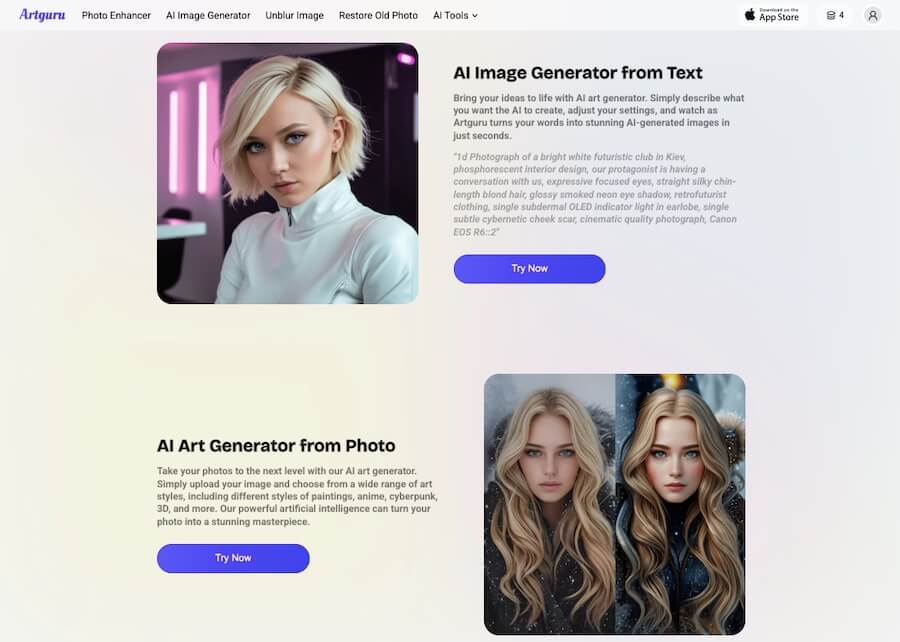
ArtGuru AI is a creative tool that uses artificial intelligence to help users craft unique art pieces and seamlessly swap faces in photos and videos. It’s like having a personal digital artist at your fingertips.
Whether you’re a professional designer or someone who just loves to play around with visuals, ArtGuru can make the process both easy and fun. From generating art based on simple text prompts to transforming photos into stunning visual pieces, this tool takes the guesswork out of digital creation.
One of the standout features of ArtGuru is its ability to perform high-quality face swaps. You can upload a picture and, in a few clicks, swap faces either in photos or even videos, perfect for creating hilarious content or personalized media.
But that’s not all. If you need to remove something from a photo, the “magic erase” feature lets you get rid of unwanted objects or distractions in seconds, leaving you with a clean and polished image.
Need a professional headshot but don’t have the time for a photoshoot? ArtGuru’s AI can generate one for you, saving time and effort.
This tool is incredibly versatile, whether you’re creating social media posts, marketing content, or just looking to have some fun. And with its intuitive interface, you don’t need to be a tech genius to use it.
Whether you’re sketching out ideas or working on a full-blown project, ArtGuru AI helps unlock creativity without the need for complex software.
Show More
Show Less
Artguru AI Review 2026: Top Features, Pricing, Pros & Cons
Artguru AI Top Features
Face Swap Tool
ArtGuru AI offers an intuitive face swap feature that lets users quickly replace faces in photos or videos. It’s perfect for fun social media content or personalized edits.
Text-to-Art Generation
You can create beautiful artwork simply by inputting a text description. ArtGuru’s AI brings your ideas to life in seconds, turning words into visuals.
Magic Erase
Remove unwanted elements from any image with the magic erase tool. It works seamlessly, giving you a clean and polished image without the need for detailed editing skills.
AI-Generated Headshots
Need a professional headshot but don’t have time? ArtGuru’s AI can generate high-quality headshots, making it a handy tool for professionals in need of quick photos.
Video Face Swap
Not just for photos, ArtGuru also allows face swaps in videos! It’s a unique feature that adds an extra layer of creativity to video content.
High-Resolution Output
ArtGuru ensures your artwork and edited images are high quality. This means you can use the results for professional purposes, like marketing or presentations.
User-Friendly Interface
You don’t need to be a tech expert to use ArtGuru. The interface is simple, making it accessible to everyone, from beginners to more advanced creators.
Style Selection
When generating art, you can choose from various styles. Whether you prefer realism, abstract, or something in between, ArtGuru gives you options.
Cross-Platform Access
ArtGuru is available on multiple platforms, ensuring you can create from anywhere—on your desktop or mobile device.
Free Version Available
While premium features are available, ArtGuru also offers a free version, making it accessible for users who want to explore the basics before upgrading.
Artguru AI Pros & Cons 2026
Pros
Easy-to-use interface, no complex skills required.
Quick face swaps in photos and videos.
"Magic erase" feature for seamless object removal.
AI-generated headshots save time and effort.
Offers creative flexibility with text-to-art generation.
Great for social media content and marketing visuals.
Cons
Some advanced features are locked behind premium plans.
May lack the customization depth professionals might seek.
Free version has limited functionality.
Artguru AI Pricing 2026
You can start using ArtGuru for free. While the free plan comes with limitations, you have the option to upgrade to a paid plan. Here are the plans.
Please note that pricing information may not be up to date. For the most accurate and current pricing details, please refer to the official website.
Artguru AI Use Cases
Social Media Content Creation
ArtGuru is perfect for creating engaging content for platforms like Instagram, TikTok, or Facebook. With its face swap and text-to-art tools, users can quickly generate fun, shareable visuals that stand out.
Marketing and Advertising
Businesses can use ArtGuru to design eye-catching ads and promotional material. The AI-generated art and high-resolution outputs ensure the quality needed for marketing campaigns.
Professional Headshots
For those who need a polished headshot without the hassle of a photo session, ArtGuru can generate professional-quality images in minutes, perfect for LinkedIn profiles or company websites.
Entertainment and Memes
Create hilarious face swap videos or generate meme-worthy art for personal entertainment. ArtGuru’s playful features make it ideal for users who want to have fun with their visuals.
Artistic Inspiration
Struggling with creative block? Use the text-to-art feature to quickly brainstorm visual ideas, which can serve as a foundation for further artistic projects.
Visual Storytelling
Use ArtGuru to enhance storytelling with visuals, whether you’re working on a presentation or crafting a digital narrative. It’s a great tool for illustrating concepts without hiring a designer.
Digital Content for Blogs
Bloggers can generate custom images to complement their written content. With ArtGuru, they no longer need to rely on stock photos.
E-commerce Product Visuals
Enhance product listings by creating high-quality images or editing existing photos. The AI-generated content can make your e-commerce pages visually appealing and professional.
Know More About Artguru AI
If you’ve been seeing AI-generated portraits, fantasy characters, or those slick digital paintings online and wondered how people are making them, Artguru AI is one of the tools behind that wave.
It’s designed to be beginner-friendly but still deep enough that even professionals can get something useful out of it. Let’s walk through what it does, why people use it, and how you can make the most of it.
So, What Exactly is Artguru AI?
Think of Artguru as a creative assistant. Instead of spending hours sketching or learning complex design software, you just describe what you want and let the system take the first swing at it.
That could be something simple like “a cartoon version of my selfie” or more detailed, like “a futuristic knight in glowing armor walking through a neon city.” Within seconds, you’ll have images that match your idea.
The beauty is that you don’t need to be an artist to start. Whether you’re curious about how you’d look as an anime character or you’re a marketer who needs a quick background visual for a campaign, it gives you a starting point without the heavy lifting.
The Different Ways You Can Use It
One of the reasons people stick with Artguru is that it doesn’t lock you into a single mode. It offers a few key options depending on what you’re trying to do:
Text-to-image: This is the most fun. Just type a description, and Artguru will turn words into visuals.
Photo-to-art: Upload a picture, maybe a selfie, a pet photo, or a landscape, and transform it into different artistic styles like oil painting, sketch, or even 3D.
Avatars and characters: If you want an anime persona, a stylized cartoon, or a fantasy hero version of yourself, this feature lets you generate variations until you find one that feels right.
Editing and polishing: After generation, you can clean up the results. Tools like background removal, upscaling, and detail enhancement make sure the final image looks sharp enough for social media or even print.
So, it’s not just about generating images, it’s also about refining them into something you’d actually want to use.
Why It’s Useful in Everyday Scenarios
Let me give you a few examples to show how versatile it is.
Imagine you’re a small business owner who needs a banner for Instagram. Hiring a designer might not be in the budget. With Artguru, you can type in your theme, choose a style, polish the final image, and have something post-ready in less than ten minutes.
Or maybe you’re a student working on a project about Greek mythology. Instead of grabbing stock photos, you could generate custom illustrations of gods and heroes to make your work stand out.
Even if you’re just experimenting for fun, it’s addictive. People love generating “alternate universe” versions of themselves, like a Renaissance portrait one day and a cyberpunk mercenary the next.
How Much Does It Cost?
The good news is that you can try it for free. Artguru gives you daily credits so you can play around without paying anything. That’s enough if you’re just testing or using it casually.
If you want higher-resolution images, faster results, or the rights to use images commercially, you’ll need a subscription. The paid plans aren’t outrageous, about the cost of a streaming service each month, and if you go for a yearly plan, it comes down even further.
For casual fun, the free credits will probably do the job. For creators, freelancers, or marketers who want reliable, polished outputs, the subscription is worth it.
Things to Keep in Mind
Like any AI tool, Artguru isn’t flawless. Sometimes the results don’t perfectly match your idea, and you’ll need to re-phrase your prompt or generate a few versions to get what you want.
Internet access is also required; no offline mode yet. And while it gives you plenty of styles, it’s not going to fully replace a professional illustrator if you need something ultra-custom.
That said, the editing tools make a big difference. Being able to upscale, sharpen, and tweak details means you’re not stuck with “almost good” results. With a bit of patience, you can get outputs that look surprisingly professional.
Final Thoughts: Is Artguru AI Worth Trying?
If you’ve ever wanted to see your imagination come to life without needing advanced art skills, Artguru AI is a great place to start. It’s approachable, playful, and practical at the same time. You can use it for fun experiments, serious projects, or just to explore what AI can do for visual creativity.
For beginners, it lowers the barrier to entry. For professionals, it speeds up brainstorming and gives you polished visuals in less time. Either way, it’s one of those tools that feels like having a mini creative partner right on your phone or browser.
So, whether you want to design a fantasy character, sharpen an old photo, or generate quick artwork for your next idea, Artguru AI has the tools to make it happen.
Artguru AI Questions & Answers
Q1. What is ArtGuru AI?
ArtGuru AI is an AI-powered tool designed to help users create art, swap faces in photos and videos, and edit images. It offers features like text-to-art generation, magic erase, and AI-generated headshots.
Q2. Is ArtGuru AI free to use?
ArtGuru offers a free version with basic functionality. However, some advanced features are available only in the premium subscription plans.
Q3. Can ArtGuru swap faces in videos?
Yes, ArtGuru allows users to perform face swaps not just in photos but also in videos, making it versatile for creating fun and engaging content.
Q4. How does the magic erase feature work in ArtGuru?
The magic erase tool lets users remove unwanted elements from images quickly. It automatically blends the surrounding pixels to give the image a seamless look after the object is removed.
Q5. Can I generate professional headshots with ArtGuru?
Yes, ArtGuru offers an AI-generated headshot feature, which allows users to create professional-looking headshots without needing a photographer.
Q6. Does ArtGuru provide high-resolution outputs?
Yes, ArtGuru ensures that the images and visuals created using its tools are high resolution, suitable for professional use like marketing or presentations.
Get our daily email newsletter with trending AI news and top AI tools. Subscribe for FREE.
Theaihunter uses cookies
This website uses cookies to enhance user experience and to analyze performance and traffic on our website. By continuing to browse this site you are agreeing to our use of cookies.