

Is Steve AI worth it?
Yes for explainers, ads and training clips from short scripts, with the caveat that output can be uneven and listed prices conflict. Pro is the plan most buyers will need.
Choose Steve AI if you
- Make animated explainers, ads and training videos from a script
- Want animation, live-action and generative styles in one tool
- Want no Steve AI watermark and unlimited exports on paid plans
- Want to test with a free plan before paying
Look elsewhere if you
- Need long scripts to turn into full-length videos reliably
- Need clear refund terms and fast support replies
- Need credits to roll over from month to month
- Want one stable, clearly listed price
Steve AI scores
Eight creator-focused checks, each out of 5. We scored Steve AI from the vendor’s pricing page, independent reviews and user complaints, checked in November 2026.
Quality varies by video type, and one reviewer says a 10-minute script produced a 40-second slideshow.
Animation, live-action, talking head, generative and hybrid videos give wide range from one editor.
Scenes, characters, voices and backgrounds are editable, but reviewers call it template-based with limited customization.
G2 reviewers list ease of use as the top strength with 71 mentions, and Capterra rates it 4.4.
The pricing FAQ does not address commercial use. A third-party review says paid plans allow it and reselling is Enterprise only.
Starter at about $19 a month billed yearly is a low entry price, but listed prices conflict across sources.
Credits reset each billing cycle and do not roll over, and generative credits are only 120 seconds on Starter and Pro.
A free plan exists with a watermark and limited downloads, yet G2 reviewers still list lack of free access among top complaints.
Steve AI pricing in 2026
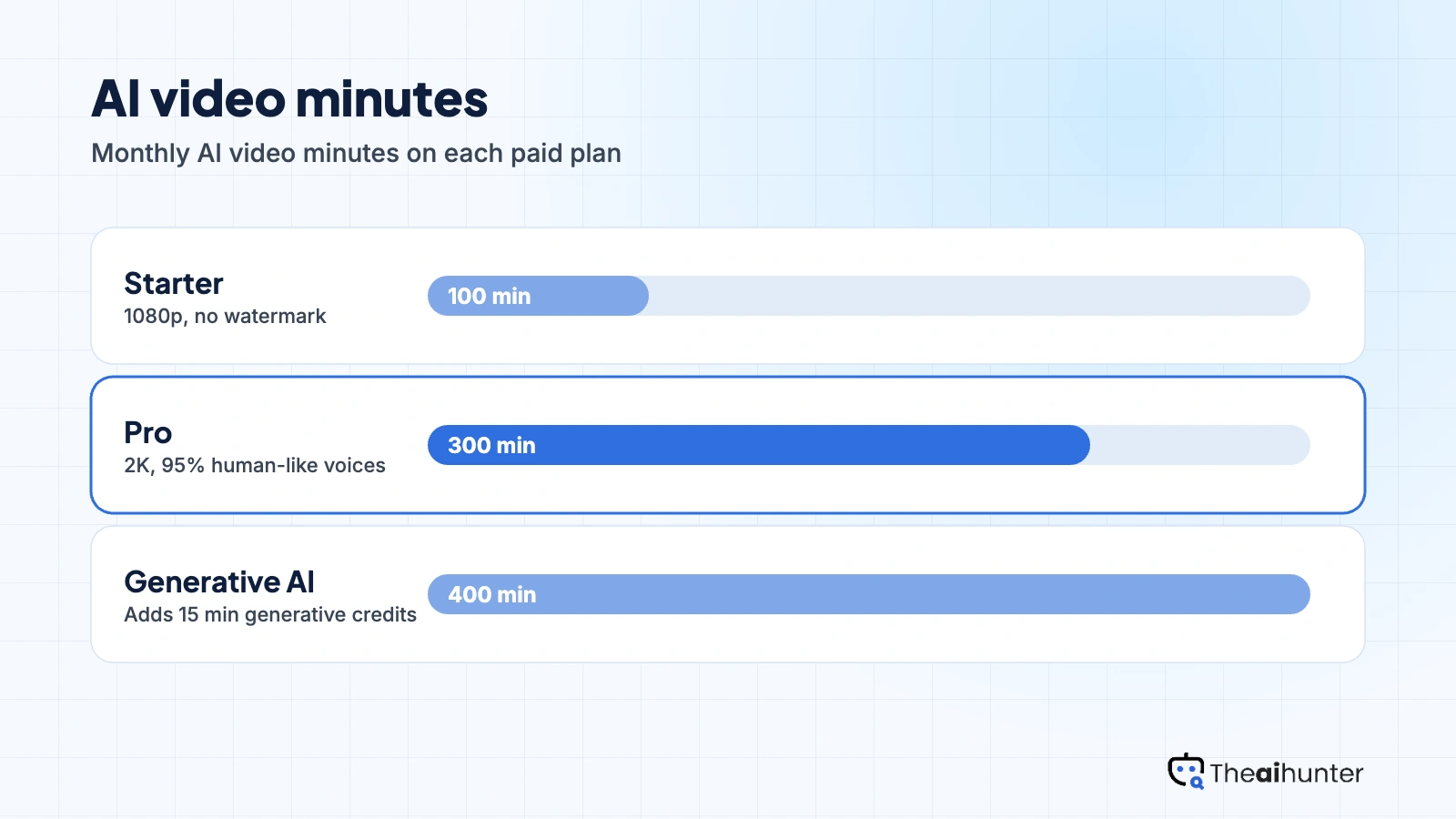
Steve AI bills by minutes of AI video and credits for images and generative clips. Each plan sets monthly allowances that reset every cycle.
| Plan | Price a month | Credits | Video, roughly | What it adds |
|---|---|---|---|---|
| Starter | $19 | 100 min | 800 | 1080p, no watermark, 120 sec generative credits |
| ProMost creators | $41 | 300 min | 2,400 | 2K, 95% human-like voices, 120 sec generative credits |
| Generative AI | $90 | 400 min | 3,200 | 15 min generative credits, 100% human-like voices |
USD prices are our estimate. Steve AI’s pricing page showed rupees on November 18, 2026 and its listed dollar figures conflict, so we matched the plan structure to reviewer-reported charges: Starter about $29 monthly or $19 yearly, Pro $59 or about $41, Generative AI $129 or about $90. Yearly billing saves 25 to 30 percent. The checkout is final.
What a month of content really costs
Starter gives 100 AI video minutes and 800 images and stock a month, with 1080p and no watermark.
Pro gives 300 minutes, 2,400 images and stock, 2K output and more natural voices.
Generative AI gives 400 minutes and 15 minutes of generative credits for AI-made scenes.
Yearly-billed rates shown. Monthly billing is about $29, $59 and $129, and unused credits do not roll over.
Can you monetize Steve AI videos?
Not confirmed by the FAQ. The pricing FAQ does not address commercial use. A third-party review says paid plans allow publishing and monetizing, free exports are watermarked, and reselling is reserved for Enterprise. Confirm with Steve AI before client work.
| What you want to do | Starter | Pro | Generative AI |
|---|---|---|---|
| Monetize on YouTube or TikTok | FAQ is silent | FAQ is silent | FAQ is silent |
| Steve AI watermark | None | None | None |
| Reselling rights | Enterprise only | Enterprise only | Enterprise only |
| Video resolution | 1080p | 2K | 2K |
| Human-like voices | Up to 90% | 95% | 100% |
| Generative credits | 120 sec | 120 sec | 15 min |
| Credit rollover | No | No | No |
Ask Steve AI support for commercial terms in writing and keep a record of your plan for each video. Do not publish free-plan exports commercially, since they carry the Steve AI watermark.
Steve AI features for creators
Six parts of the platform, each tied to the plan or limit that applies.
Generative AI videos
Create scenes from prompts using generative credits, 120 seconds on Starter and Pro and 15 minutes on Generative AI.
Generative creditsAnimation
Build animated videos with 300+ characters, actions and backgrounds from a script.
All paid plansLive-action and stock
Assemble videos from AI images and premium stock, 800 a month on Starter and up to 3,200.
Capped by plan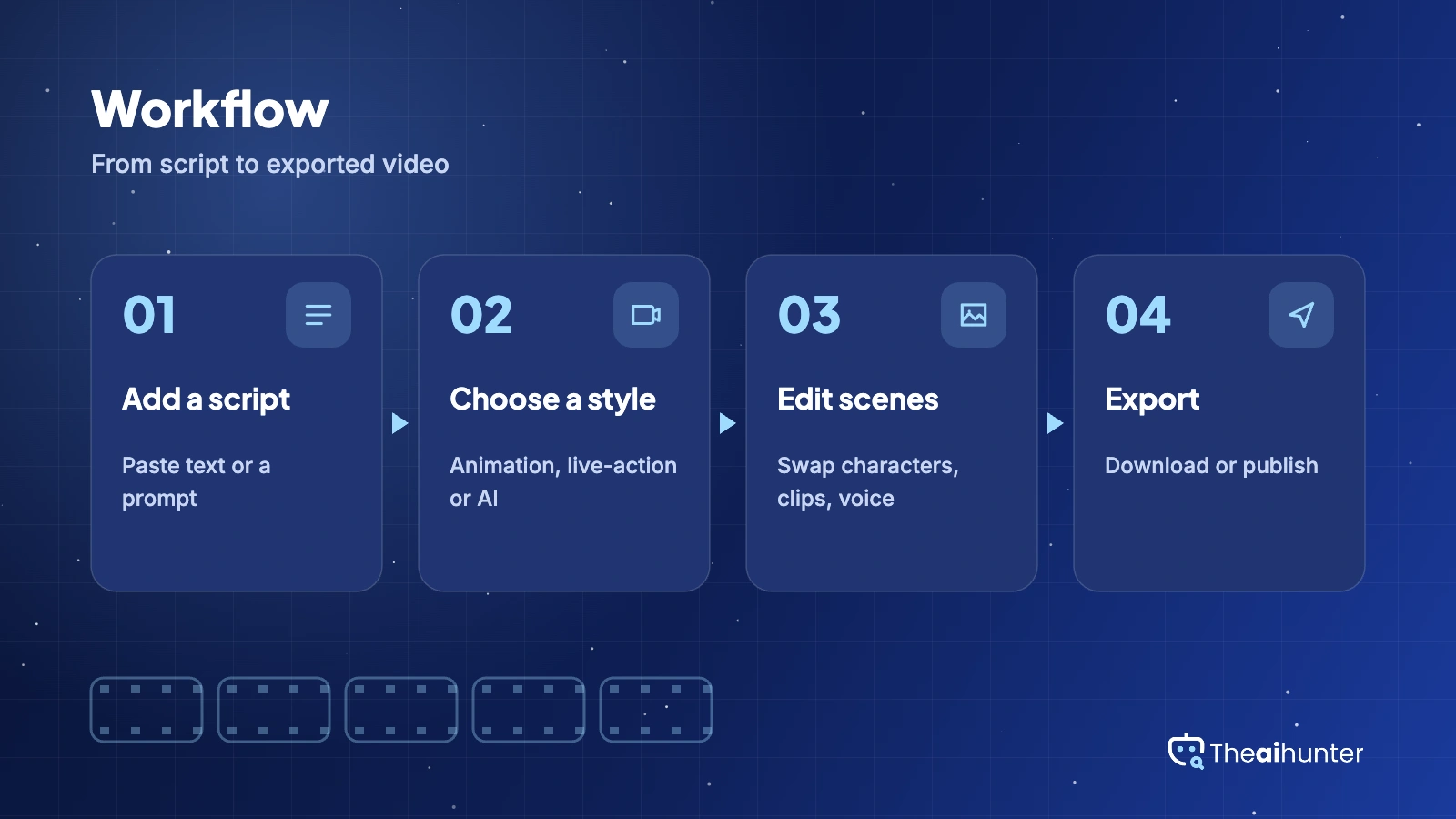
Talking head
Turn a script into a presenter-style video with human-like voices.
Voice quality by planVoices and subtitles
Voices range from up to 90% human-like on Starter to 100% on Generative AI, with subtitles built in.
By planAPI access
Third-party listings say Steve AI offers API access for automation.
Check with vendorPros and cons
Pros
- Five video styles in one tool, from animation to generative scenes
- Easy to learn, with ease of use the top strength on G2
- Paid plans export without a Steve AI watermark and with no export cap
- A free plan lets you test the editor before paying
Cons
- Free exports carry a Steve AI watermark and limited downloads
- Credits reset each cycle and do not roll over
- Long scripts can come out as short slideshows, reviewers say
- Prices are inconsistent across the page and third-party listings
What users complain about
The problems reported most often on Trustpilot, G2 and Capterra, as of November 2026.
Script output falls short
A Trustpilot reviewer says a 10-minute script pasted into the 32,000-character box produced a 40-second slideshow of 8 scenes. Fix: write short scripts scene by scene and test one before you scale.
Refunds and slow replies
Trustpilot reviewers report promised refunds that did not arrive, and the company profile shows replies to 69% of negative reviews, usually after more than a month. Fix: start with monthly billing and keep your emails.
Downloads and free access
G2 lists lack of free access (20 reviews) and download issues (19 reviews) among the top cons. Fix: test an export on the free plan before you pay.
Conflicting prices
Listings show different entry prices across sites, and the pricing page showed rupees and mixed figures. Fix: confirm the plan, price and credits at checkout.
Steve AI alternatives
If you want clearer pricing, longer videos or avatar presenters, these four are worth comparing.



Steve AI FAQ
Is Steve AI free?
Yes, with limits. The free plan exports videos with a Steve AI watermark at 720p, with limited downloads and a small credit allowance. Sources disagree on the exact numbers, with the vendor page listing 5 video-generation credits and 10 image credits.
How much does Steve AI cost a month?
Starter is about $19 a month billed yearly or $29 monthly. Pro is about $41 yearly or $59 monthly, and Generative AI is about $90 yearly or $129 monthly. These are our estimates, since the pricing page showed rupees and conflicting dollar figures.
How much does Steve AI save on yearly billing?
The pricing page says 30 percent, while its FAQ says 25 percent. Yearly subscribers still receive their credits monthly, not in one lump, so the discount buys a lower price and not a bigger allowance.
Does Steve AI add a watermark?
Free-plan exports carry a visible Steve AI watermark in the corner. Paid plans list no Steve AI watermark and unlimited video exports.
Can I monetize Steve AI videos?
The pricing FAQ does not address commercial use. A third-party review says paid plans allow publishing and monetizing, free exports are watermarked, and reselling rights are reserved for Enterprise. Confirm the terms with Steve AI in writing before client work.
Do Steve AI credits roll over?
No. The pricing page says unused credits reset at the start of each billing cycle, on both monthly and yearly plans. Plan your monthly minutes accordingly, since leftovers are lost.
What are Steve AI generative credits?
They pay for AI-generated scenes. Starter and Pro include 120 seconds a month and the Generative AI plan includes 15 minutes. Steve AI also sells Power Up add-ons, and its page says add-ons are not available with PayPal or UPI.
Should I buy the Steve AI AppSumo deal?
Be careful. Trustpilot reviewers who bought the lifetime deal say they do not get newer features and were told to open a new account to access them. Check what the deal includes today before you buy.
Can Steve AI turn a long script into a full video?
Test it first. One Trustpilot reviewer pasted a 10-minute script and got a 40-second slideshow of 8 scenes. Plans are sized in AI video minutes, so short scripts and scene-by-scene editing work best.
What is the best Steve AI alternative?
Pictory AI suits blog and script videos, InVideo AI works from a prompt with an AI agent, and Fliki is stronger for voiceover-led videos. Compare how each one meters minutes and credits.
How we review AI video tools
Every video tool on Theaihunter goes through the same four steps and gets the same eight scores, so any two video tool scores on this site can be compared directly.
Read the vendor’s own pages
Plans, credit and minute limits, and license terms come from the product’s site first. We note the date we checked each one.
Test what we can reach
We sign up and check what the free plan and settings allow. When a login or paid credits are needed to go further, the review says what we did not test. Samples go on the page only when the license permits it.
Cross-check what users report
Independent reviews and user complaints from the last six months show what the sales page leaves out. Numbers copied across lookalike sites count once.
Score, date and update
Eight areas get a score from 1 to 5. When pricing or plans change, we recheck the review and log the change in its history.
How the score works
Each area is scored from 1 to 5. The overall score is their average, rounded to one decimal.
It is the same number on the review, the category page and anywhere else the tool appears.
- No review, no score. Tools we have not reviewed in full are never ranked.
- A strong output cannot hide unclear licensing, because each area is scored on its own.
Some links earn us a commission. A score or verdict is never changed because of one.
Prices, credits and limits are checked against the vendor’s pages and dated. When sources disagree, the review says so.
If we used a feature, we say so. If a detail comes from user reports, the review labels it as reported.
Ready to try Steve AI?
Test the free plan to see output quality, then confirm the plan price and credits at checkout before you pay.
